Demystifying Gas Smart Meter Readings: A Technical Guide
The transition from analog diaphragm meters to digital gas smart meters represents a significant technological shift in utility management. These devices offer enhanced data granularity and remote communication capabilities, enabling more precise consumption tracking and billing. Understanding the specific procedures and underlying technical principles for reading these meters is critical for accurate energy monitoring and expense reconciliation.
Gas Smart Meter Architectures and Display Protocols
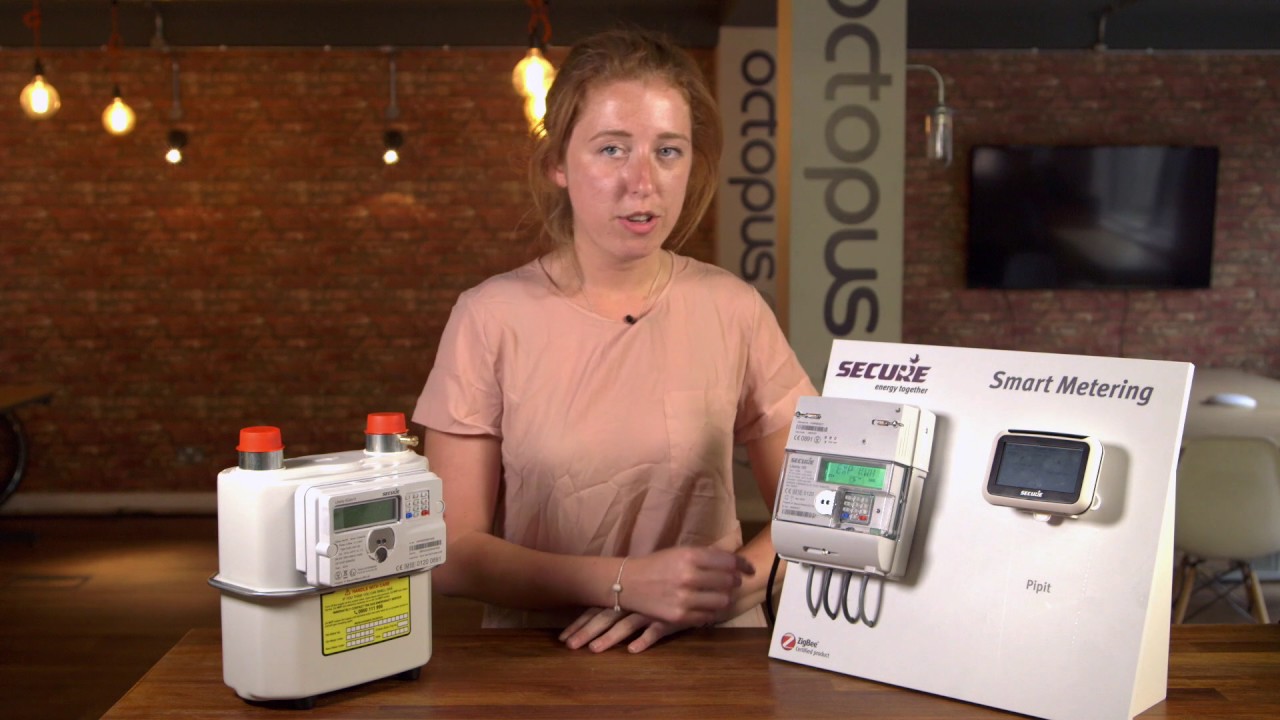
Modern gas smart meters operate on either SMETS1 (Smart Metering Equipment Technical Specifications 1) or SMETS2 protocols, with SMETS2 being the current standard, offering greater interoperability and enhanced security. Physically, these meters feature an integrated LCD (Liquid Crystal Display) that typically presents a cumulative volume reading in cubic meters (m³), often to two or three decimal places. Unlike older cyclometer displays, digital interfaces remove ambiguity regarding digit alignment. Key data points displayed typically include a 6-digit main read, a 2-digit decimal fraction, and various status indicators. The meter’s integral display serves as the definitive source for consumption data, distinguishing it from the often-associated In-Home Display (IHD), which provides near real-time, but not always billable, data via a Zigbee Home Area Network (HAN) connection operating at 2.4 GHz.

Reading Procedures and Data Interpretation
Accessing the cumulative meter reading generally involves a specific button sequence, commonly an ‘A’ or ‘OK’ button press on the meter’s faceplate. For many SMETS2 meters (e.g., variants from Landis+Gyr, Sensus, or Elster), a single press will cycle through display screens, with the primary gas read (usually prefixed “VOLUME” or similar) appearing first. This value should be recorded precisely, including all digits before and after the decimal point. For example, a reading of “00123.456 m³” indicates 123.456 cubic meters. It is crucial to differentiate this cumulative reading from other displayed metrics such as daily consumption, tariff information, or diagnostic codes, which may also be accessible via subsequent button presses. Manual verification against the meter’s physical display ensures concordance with the utility’s transmitted data, mitigating potential discrepancies arising from IHD refresh rates or communication lags. The meter itself retains a precise, verified timestamp for each transmitted reading.
Data Transmission, Units, and Energy Conversion
Gas smart meters transmit consumption data, primarily via a Wide Area Network (WAN) connection, to a central Data Communications Company (DCC) for secure routing to the energy supplier. SMETS2 meters are mandated for half-hourly (HH) data transmission, though most suppliers default to daily or monthly reads unless specific consent for HH data is provided by the customer. This enables granular consumption analysis. The raw meter reading in cubic meters (m³) must be converted to kilowatt-hours (kWh) for billing purposes, as kWh represents the actual energy content. The conversion formula is:
Energy (kWh) = Volume (m³) * Calorific Value (MJ/m³) * Pressure Factor * 1.02264 / 3.6 (MJ/kWh).
For instance, a typical UK calorific value might be 39.5 MJ/m³, and the pressure factor is commonly around 1.02264 (derived from standard temperature/pressure corrections). Thus, 1 m³ could equate to approximately 11.18 kWh (e.g., 1 * 39.5 * 1.02264 / 3.6 ≈ 11.18 kWh). This conversion ensures that customers are billed for the actual energy consumed, accounting for variations in gas quality and delivery pressure, which are normalized by the utility.
- Cumulative Meter Reading (m³): The primary 6-8 digit value displayed, including decimal places, representing total gas consumed since installation.
- Date and Time of Reading: Crucial for correlating with billing periods or consumption analytics, often logged internally by the meter.
- Meter Serial Number: A unique alphanumeric identifier (e.g., G4S-XYZ123456) essential for accurate record-keeping and supplier verification.
- Tariff Information: While not always displayed prominently on the meter itself, understanding the current unit rate (p/kWh) is vital for cost estimation.
- Status or Error Codes: Any alphanumeric codes displayed, which may indicate communication issues (e.g., ‘NO WAN’), battery status, or system faults.
- Units of Measurement: Confirming the displayed unit is cubic meters (m³) and not cubic feet (ft³), which would require a different conversion factor (1 ft³ ≈ 0.0283 m³).
- Misinterpreting Decimal Places: Recording only integer values or incorrectly rounding the decimal portion can lead to significant billing errors, especially over extended periods.
- Confusing Cumulative with Daily Usage: The primary meter screen shows total consumption; accessing daily or historical data typically requires additional button presses and should not be confused with the main read.
- Ignoring Meter Serial Number Verification: Failure to cross-reference the meter’s serial number with utility records can result in recording data from an incorrect meter, particularly in multi-dwelling units.
- Assuming IHD Read is Definitive: The In-Home Display provides convenience but can lag or temporarily display inconsistent data. The meter’s physical display is the official record for billing.
- Incorrect Button Sequencing: Repeatedly pressing buttons randomly can inadvertently alter settings or enter diagnostic menus, potentially obscuring the necessary reading.
- Neglecting Unit Confirmation: While most modern gas meters use m³, older or international variants might use ft³, necessitating careful unit conversion and verification.
How does a gas smart meter transmit data?
Gas smart meters transmit data primarily through a layered communication architecture. Locally, they communicate with an In-Home Display (IHD) via a 2.4 GHz Zigbee Home Area Network (HAN). For transmitting billable consumption data to the utility, the meter uses a Wide Area Network (WAN) module, often utilizing cellular (e.g., 2G/3G/4G) or dedicated radio frequency networks. In the UK, this data is routed via the Data Communications Company (DCC) to ensure secure and standardized transmission to the relevant energy supplier.
What is the difference between SMETS1 and SMETS2 gas meters?
SMETS1 (Smart Metering Equipment Technical Specifications 1) meters were early-generation devices with limited interoperability, often losing smart functionality when a customer switched suppliers. SMETS2 meters, the current standard, offer enhanced interoperability, allowing them to retain smart features regardless of supplier changes. Technically, SMETS2 meters are mandated for half-hourly data transmission (though often set to daily by default) and support over-the-air firmware updates and more robust security protocols, improving data reliability and consumer flexibility.
Why do my smart meter readings sometimes differ from my In-Home Display?
Discrepancies between your smart meter’s physical display and your In-Home Display (IHD) are common and typically arise from a few technical factors. The IHD receives data from the meter via a local Zigbee HAN, and while generally near real-time, there can be a slight communication lag or refresh delay, typically ranging from a few seconds to several minutes. Furthermore, the IHD may sometimes display estimated consumption figures or rounded values for user convenience, whereas the meter’s internal register and physical display are the definitive, unrounded, and billable source of data. Always refer to the meter itself for the most accurate reading.